1.) How to Paste a Blank Status On Facebook :
Today i will show u how to publish a single line or multiple line Blank Status on facebook. you can also use this method in Facebook Comments, So lets get started.
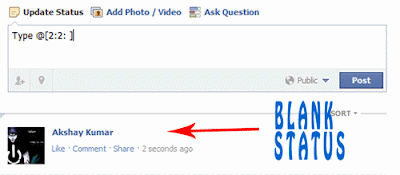
- Copy below codes into your status
- @[0:0: ] (or) @[2:2: ]
2.) How To View Facebook Locked Profile Picture ?
Sometime you want to see clear image of someone on
facebook who might not be your friend but his/her privacy setting stop you from doing
this. In this tutorial i will teach you to view facebook private or
locked profile picture in large size with very simple trick.
- Open the facebook profile of person whose profile picture is locked or is set to private.
- Right click on the profile picture and click on Copy Image Url as shown in image below.

- Open that image in new tab by right clicking and selecting Paste (CTRL + V)
- Now change the value of image size highlighted below which might bes160x160 to s720x720 (If its not clear try (s320x320)

- The image will enlarge in size. This trick does not always work.
3.) Keyboard Shortcuts For Facebook :

Facebook is one of the most popular social networking site where most of us spend hours chatting and surfing on facebook. So here are some usefull facebook keyboard shortcuts for Google chrome and Mozilla Firefox users.
For Google Chrome & Mozilla Firefox Browser :
- Alt+1: View your News Feed
- Alt+2: View your own Profile
- Alt+3: View pop-up of friend requests
- Alt+4: View pop-up of messages
- Alt+5: View pop-up of notifications
- Alt+6: View Account Settings
- Alt+7: View Privacy Settings
- Alt+8: View Facebook’s own profile
- Alt+9: Read latest Terms of Service agreement.
Posted by: Karthik Ravikumar
Labels: INTERESTING TRICKS
No comments:
Post a Comment